kafka example with nestjs, python
what to do
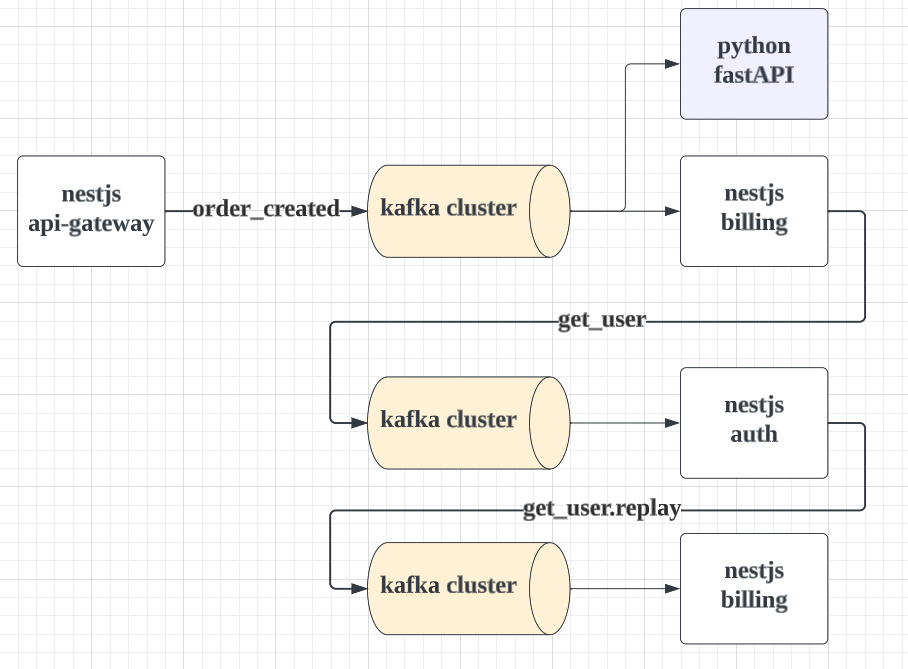
구성 = nestjs 서버 3 + python 서버 1
- nestjs-api-gw
- nestjs-billing
- nestjs-auth
- python-fastAPI
절차
1 nestjs-api-gw 가 order_created 토픽에 사용자 주문관련 메시지 발행
2 nestjs-billing 가 메시지를 받아서 처리한다. get_user라는 토픽을 발행 및 토픽을 구독
3 nestjs-auth 가 get_user 토픽의 메시지를 받아서 내용을 리턴한다. (이는 get_user.reply 토픽으로 발행됨 )
4 nestjs-billing 가 응답을 받는다.
5 python-fastAPI가 1번에 의해, order_created 토픽에 발행된 메시지를 받고 콘솔 출력 한다.
추가 설명
1번 절차에서는 메시지를 단방향으로 흐르게 했다. emit 함수로 보내고 EventPattern 으로 받는다.
2번 절차에서는 메시지를 양뱡향으로 주고받게 했다.
- 내부적으로는 2개의 토픽으로 단방향으로 구현된다.
- 송신자 : 애플리케이션에서는 send, subscribe라는 메서드로 바인딩 시킨다.
- 수신자 : EventPattern으로 받는다.
1.kafka install with docker
2.nest js
git repo : https://github.com/mguay22/nestjs-kafka-microservices
nvm use 18
npm i -g @nestjs/cli

nest new api-gateway
nest new billing
nest new auth

yarn add @nestjs/microservices kafkajs
api-gateway
// 1. 카프카 모듈 import
import { Module } from '@nestjs/common';
import { ClientsModule, Transport } from '@nestjs/microservices';
import { AppController } from './app.controller';
import { AppService } from './app.service';

@Module({
  imports: [
    ClientsModule.register([
      {
        name: 'BILLING_SERVICE', // DI token
        transport: Transport.KAFKA,
        options: {
          client: {
            clientId: 'billing', // 다른 클라이언트와 식별이 되어야 하는가?
            brokers: ['localhost:10000','localhost:10001','localhost:10002'], // 클러스터인 경우 모든 브로커 입력
          },
          consumer: {
            groupId: 'billing-consumer', // 필요없는듯?
          },
        },
      },
    ]),
  ],
  controllers: [AppController],
  providers: [AppService],
})
export class AppModule {}
---
// 2. 서비스 inject
import { Inject, Injectable } from '@nestjs/common';
import { ClientKafka } from '@nestjs/microservices';
import { CreateOrderRequest } from './create-order-request.dto';
import { OrderCreatedEvent } from './order-created.event';

@Injectable()
export class AppService {
  constructor(
    @Inject('BILLING_SERVICE') private readonly billingClient: ClientKafka,
  ) {}

  createOrder({ userId, price }: CreateOrderRequest) {
    // emit 메서드를 이용해 메시지 발행
    this.billingClient.emit(
      'order_created', // 토픽
      new OrderCreatedEvent('125', userId, price), // 메시지 값
    );
  }
}
billing
마이크로서비스로, 포트 오픈없이 카프카 구독 후 프로세스 작동시킨다.
//1. main.ts
import { NestFactory } from '@nestjs/core';
import { MicroserviceOptions, Transport } from '@nestjs/microservices';
import { AppModule } from './app.module';

async function bootstrap() {
  const app = await NestFactory.createMicroservice<MicroserviceOptions>(
    AppModule,
    {
      transport: Transport.KAFKA,
      options: {
        client: {
          brokers: ['localhost:10000','localhost:10001','localhost:10002'],
        },
        consumer: {
          groupId: 'billing-consumer',
        },
      },
    },
  );
  app.listen();
}
bootstrap();

---
//2. app.module.ts
import { Module } from '@nestjs/common';
import { ClientsModule, Transport } from '@nestjs/microservices';
import { AppController } from './app.controller';
import { AppService } from './app.service';

@Module({
  imports: [
    ClientsModule.register([
      {
        name: 'AUTH_SERVICE',
        transport: Transport.KAFKA,
        options: {
          client: {
            clientId: 'auth',
            brokers: ['localhost:10000','localhost:10001','localhost:10002'],
          },
          consumer: {
            groupId: 'auth-consumer',
          },
        },
      },
    ]),
  ],
  controllers: [AppController],
  providers: [AppService],
})
export class AppModule {}

---
//3. app.controller.ts
import { Controller, Get, Inject, OnModuleInit } from '@nestjs/common';
import { ClientKafka, EventPattern } from '@nestjs/microservices';
import { AppService } from './app.service';

@Controller()
export class AppController implements OnModuleInit {
  constructor(
    private readonly appService: AppService,
    @Inject('AUTH_SERVICE') private readonly authClient: ClientKafka,
  ) {}

  @EventPattern('order_created')
  handleOrderCreated(data: any) {
    console.log("-->data",data);
    this.appService.handleOrderCreated(data.value);
  }

  onModuleInit() {
    this.authClient.subscribeToResponseOf('get_user');
  }
}

---
// 4. app.service.ts
import { Inject, Injectable } from '@nestjs/common';
import { ClientKafka } from '@nestjs/microservices';
import { GetUserRequest } from './get-user-request.dto';
import { OrderCreatedEvent } from './order-created.event';

@Injectable()
export class AppService {
  constructor(
    @Inject('AUTH_SERVICE') private readonly authClient: ClientKafka,
  ) {}

  handleOrderCreated(orderCreatedEvent: OrderCreatedEvent) {
    this.authClient
      .send('get_user', new GetUserRequest(orderCreatedEvent.userId))
      .subscribe((user) => {
        console.log(
          `Billing user with stripe ID ${user.stripeUserId} a price of $${orderCreatedEvent.price}...`,
        );
      });
  }
}
auth
마이크로서비스로, 포트 오픈없이 카프카 구독 후 프로세스 작동시킨다.
// 1. main.ts
import { NestFactory } from '@nestjs/core';
import { MicroserviceOptions, Transport } from '@nestjs/microservices';
import { AppModule } from './app.module';

async function bootstrap() {
  const app = await NestFactory.createMicroservice<MicroserviceOptions>(
    AppModule,
    {
      transport: Transport.KAFKA,
      options: {
        client: {
          brokers: ['localhost:10000','localhost:10001','localhost:10002'],
        },
        consumer: {
          groupId: 'auth-consumer',
        },
      },
    },
  );
  app.listen();
}
bootstrap();
---
// 2.app.controller.ts
import { Controller, Get } from '@nestjs/common';
import { MessagePattern } from '@nestjs/microservices';
import { AppService } from './app.service';

@Controller()
export class AppController {
  constructor(private readonly appService: AppService) {}

  @MessagePattern('get_user')
  getUser(data: any) {
    return this.appService.getUser(data.value);
  }
}

---
// 3. app.service.ts
import { Injectable } from '@nestjs/common';
import { GetUserRequest } from './get-user-request.dto';

@Injectable()
export class AppService {
  private readonly users: any[] = [
    {
      userId: '123',
      stripeUserId: '43234',
    },
    {
      userId: '345',
      stripeUserId: '27279',
    },
  ];

  getUser(getUserRequest: GetUserRequest) {
    return this.users.find((user) => user.userId === getUserRequest.userId);
  }
}
3.python
ref : https://medium.com/@arturocuicas/fastapi-and-apache-kafka-4c9e90aab27f
install
pip3 install fastapi
pip3 install "uvicorn[standard]"
pip3 install aiokafka

// 실행
python3 -m uvicorn main:app --reload --port 5050
main.py
from typing import Union
import asyncio
import json
import os
from typing import List
from random import shuffle
from aiokafka import AIOKafkaConsumer, AIOKafkaProducer
from fastapi import FastAPI

app = FastAPI()

loop = asyncio.get_event_loop()

# deserializer
def encode_json(msg):
    to_load = msg.value.decode("utf-8")
    return json.loads(to_load)


# handler
async def handle_order_created(msg):
    print(">>handle_order_created", msg)
    jsonMessage = encode_json(msg)
    print(">>value", jsonMessage)

    print(">>orderId", jsonMessage["orderId"])
    print(">>userId", jsonMessage["userId"])
    print(">>price", jsonMessage["price"])

# 액션 리스트
kafka_actions = {
    "order_created": handle_order_created,
}


# loop를 돌면서 메시지가 들어오면 처리한다.
async def consume():
    consumer = AIOKafkaConsumer(
        "order_created",
        loop=loop,
        bootstrap_servers='localhost:10000,localhost:10001,localhost:10002',
        group_id="my-group"
    )
    try:
        await consumer.start()
    except Exception as e:
        print(e)
        return
    try:
        async for msg in consumer:
            print(">>message income", msg)
            # 토픽별로 메시지 처리하는 액션을 호출
            await kafka_actions[msg.topic](msg)
    finally:
        await consumer.stop()

asyncio.create_task(consume())

# 아래 api는 커슈머와 관련은 없다.
@app.get("/")
async def read_root():
    return {"Hello": "World"}


@app.get("/items/{item_id}")
async def read_item(item_id: int, q: Union[str, None] = None):
    return {"item_id": item_id, "q": q}

# python3 -m uvicorn main:app --reload --port 5050
ref
https://www.youtube.com/watch?v=JJEKPqSlXvk https://medium.com/@arturocuicas/fastapi-and-apache-kafka-4c9e90aab27f
more
https://docs.nestjs.com/microservices/kafka#client
https://velog.io/@anjinwoong/Nest.js-Kafka-%EC%82%AC%EC%9A%A9%ED%95%98%EA%B8%B0
https://github.com/mguay22/nestjs-kafka-microservices